Release 25.01
planeus Help Center
The new planeus Help Center replaces the former user manual and is now accessible directly from within planeus. With AI-assisted search, finding the right information becomes faster and easier than ever.

Roles & Permissions
Each user can now be assigned a specific user role. These roles define a user’s permissions per module or tab. The standard permission levels are:
- Read
- Write
- Delete
User roles are part of the user management system.
Further information can be found here:
https://help.planeus-solutions.com/users-and-licenses
Maximum Quantity per Resource
With the new Quantity LimitsQuantity Limit function, you can define how much quantity can be processed simultaneously on each resource. planeus automatically considers these limits during planning to prevent overload situations.
This feature requires a dedicated license.
Quantity Validation at Completion (Workbench Terminal)
This setting ensures that when reporting the completion of an operation, the OK-quantity of the previous operation must always be confirmed as well.
Learn more hereLearn more here
OEE Calculation Update
The calculation logic for the OEE metric has been revised to ensure more accurate insights.
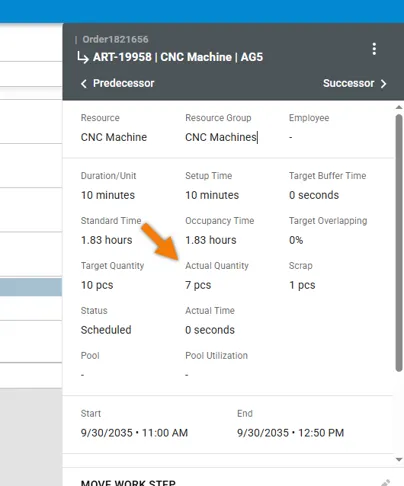
Display of Actual Quantity per Work Step
Planners now get a quick overview of how many parts/quantities have already been reported for each operation directly within the detailed time view.
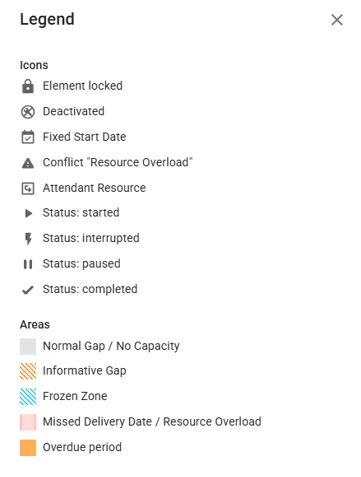
Gantt chart: More Information on Icons & Symbols
A new legend in the Gantt chart provides clear explanations for all symbols used.
Gantt Chart: Extended Filter Options
The filter in Production Planning now includes the field “Production Order Number”, making it easier to narrow down specific orders.
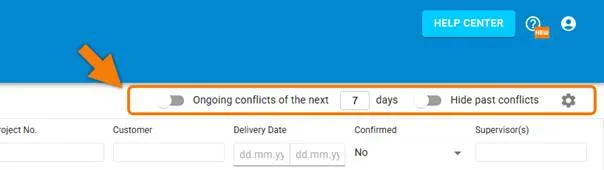
Conflict Radar: Simplified Filters
A new streamlined filtering system makes it easy to hide past conflicts and quickly set date filters for the upcoming x days.
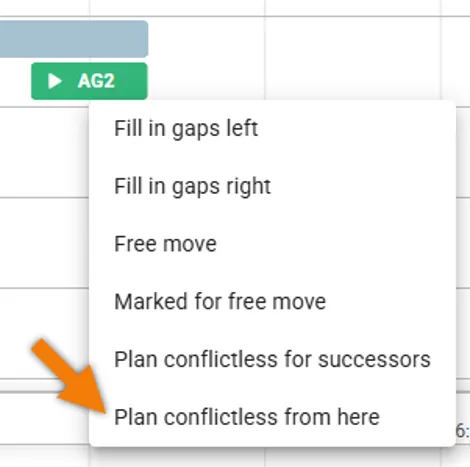
Gantt chart: New function “Plan Conflictless from here”
This function further simplifies the problem-solving process in planeus.