Release 26.01
Important note: The Expert function is no longer available as a separate function from this version onward.
Instead, the related permissions are now managed in a more detailed way through User Management → User Roles
The same applies to the previous permission regarding Plan Anyway. This permission is also now configured through User Management → User Roles.
Redesigned dashboard
The Dashboard has been redesigned with a clearer and modern layout. Two new KPIs are now available: OTIF (On-Time-In-Full) & Scrap Rate
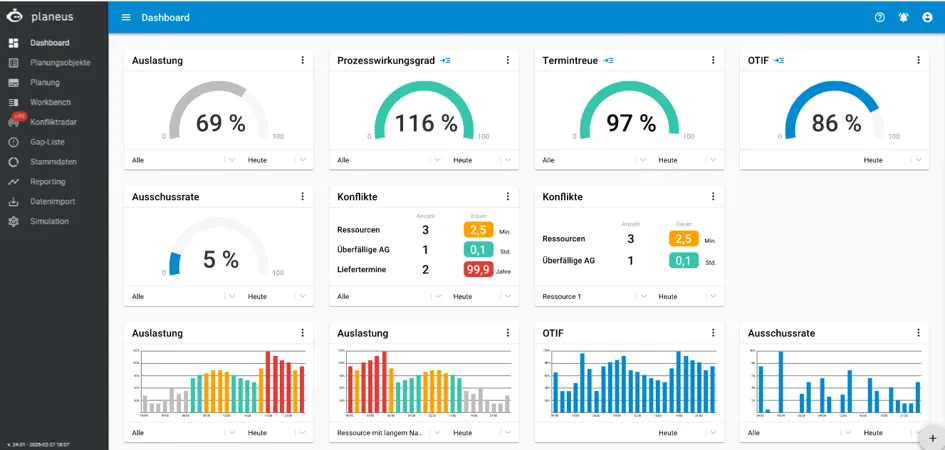
The color ranges used for KPIs and charts can be configured in the settings, which makes it easier to adapt the Dashboard to your planning and reporting needs.
Scheduling Order Items with Sequencing RankScheduling Order Items with Sequencing Rank
When you select multiple Order Items with batch selection and schedule them at the same time, you can now define in which sequence they should be planned by the system. The index of such sequence is called Sequencing Rank (Seq. Rank).
This helps you prioritize important Order Items and avoid Resource conflicts more effectively.
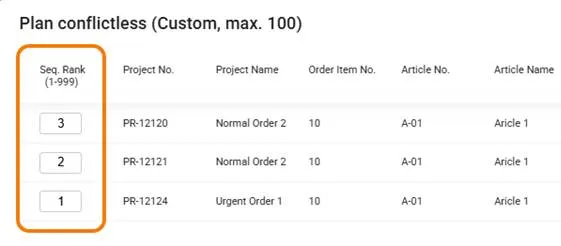
For example, you can decide which Order Item should be scheduled first when several Order item is competing for the same Resource.
Planning Objects: Updated Status Behavior
The status behavior of Planning Objects has been updated.
When a Planning Object is changed to Started or Completed, all higher-level Planning Objects are also set to Started.
They remain Started until all related lower-level Planning Objects, or all planning objects on the same level, are Completed.
The only exception is the status Interrupted.
Example in a Production Order:
Production Order | Started |
|---|---|
Work Step 1 | Completed |
Work Step 1 | Completed |
Work Step 1 | Scheduled |
In earlier versions, this case was handled differently as the Production Order would have remained in the status Scheduled.
Learn more about this updateLearn more about this update
Yield and Work Step Progress in the Order Item
The detail panel of an Order Item now shows:
- The progress of the Work Steps
- The completed quantity from the last Work Step
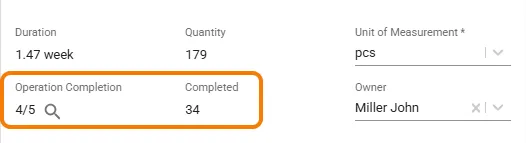
By clicking the magnifying glass icon, you can open a detailed view showing the yield for each individual Work Step.
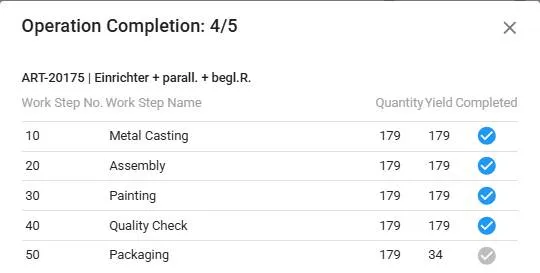
If the Order Item contains an item with subordinate assemblies, the Yield of those Assemblies are also shown.
This gives planners a clearer view of production progress directly in the Order Item.
Pausing Orders: Now regardless of Status
Previously, production orders could only be paused if they had the status Interrupted.
From this version onward, Production Orders can be paused regardless of their current status.
Exception: Production Orders with the status Completed cannot be paused.
Adjust Quantity when Unpausing Production Orders
When unpausing a production order, you can now reduce the remaining quantity that still needs to be produced.
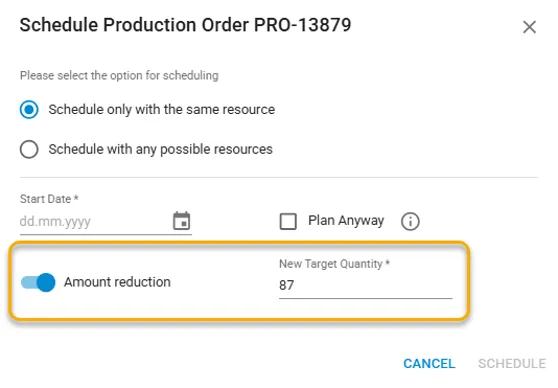
This is useful when part of the quantity has already been completed and only the remaining quantity should be planned again.
Learn more about this updateLearn more about this update
Autosaving List column widths
Column widths in list views are now saved in the browser cache.
This means your adjusted column widths remain available when you return to the list.
You can reset the column widths at any time in the drop menu after clicking in the gear icon.
Autosaving Report filters (per user)
Filter settings in reports are now saved individually for each user.
This means each user can keep their own preferred report view without affecting other users.
New Conflict navigation in the Gantt Chart
The Resource Gantt chart now can calculate the total number of Conflicts for each Resource.
By clicking the conflict indicator < ⋮ > , you can jump directly to a Conflict on that Resource
You can also use the left & right arrows to move between the Conflicts of the selected Resource.
This makes it faster to find and review planning conflicts in the Gantt chart.

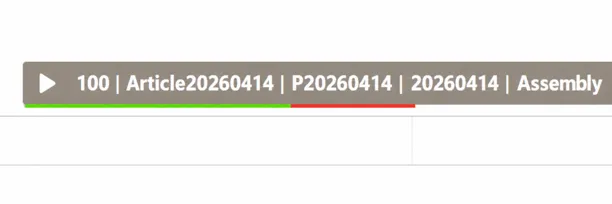
Show actual quantity and scrap in the Gantt chart
A new setting allows actual quantities to be shown directly in the Gantt chart.
When the setting is activated, the quantities of each Work Step are highlighted in color:
Green = Yield
Red = Scrap
This gives users a quick visual overview of Yield quantity and Scrap directly in the schedule.
Gantt refresh button
The Gantt now includes a refresh button.
Clicking the button updates the Gantt view without reloading the entire page.
This helps you quickly stay in the same planning context when something was changed in the play.
Recalculated Occupancy Time
The Occupancy Time of a Work Step can now be recalculated based on its current position in the Gantt chart
This function is available through the context menu.
It is useful when a work step has been moved and the planning time should be recalculated for the new position.
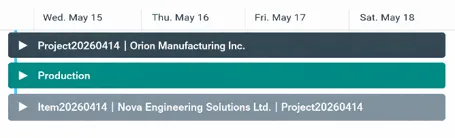
Timeline & Manufacturing Plan Views: Configurable Labels for Projects and Production Orders
The labels shown on the Gantt chart bars on Project and Production Order can now be configured by the user.
You can configure it under: Settings → Planning
This allows users to decide which information can be showned on the bars.
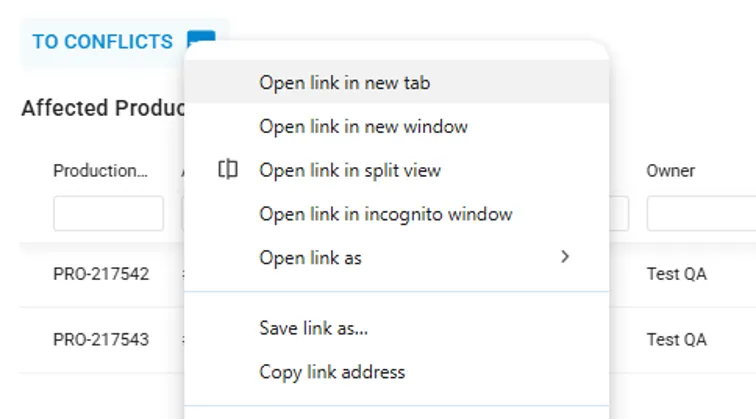
Easier Browsing: Among Planning, Planning Objects, Conflict Radar, and Workbench
Browsing experience between several areas has been improved, including:
- Planning
- Planning Objects
- Conflict Radar
- Workbench
Links between these areas now work more efficiently.
For example, you can now open items in a separate browser tab.
Qualification Matrix
Individual license required
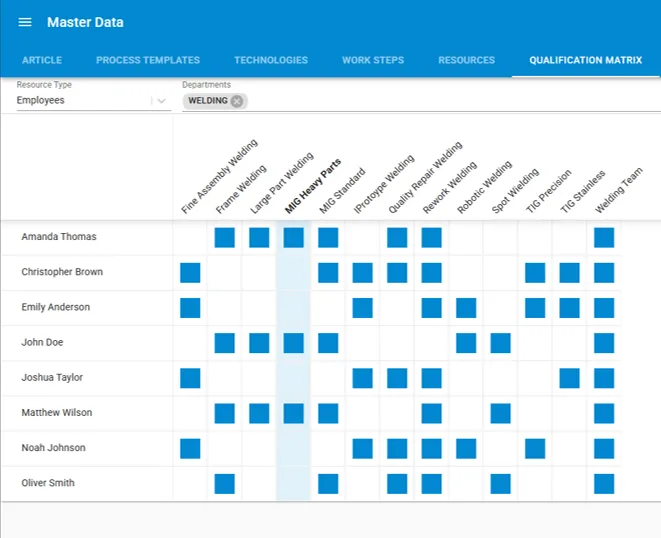
The Qualification Matrix Qualification Matrix provides an alternative way to assign Resources and Resource Groups.
It allows the qualifications of employees or machines to be managed centrally and displayed in a clear overview. This also helps planners see which Resources have the required qualifications for specific work.
Custom fields in Workbench Classic and Terminal Custom fields in Workbench Classic and Terminal
Individual license required
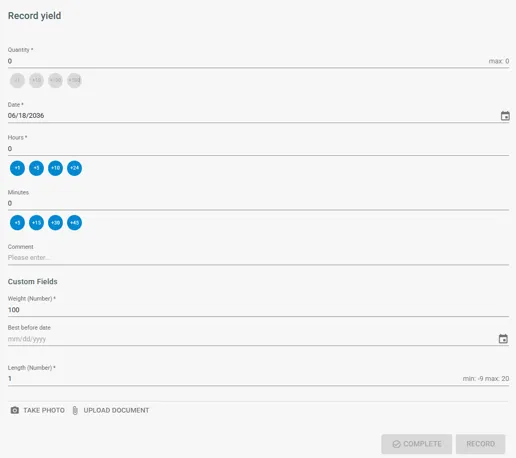
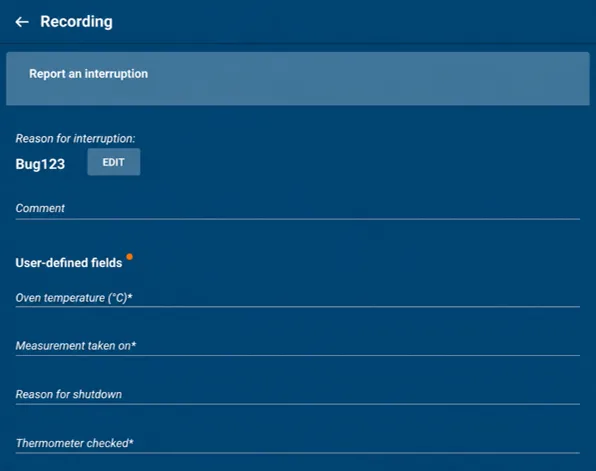
Custom input fields can now be created in the Workbench. The entered values are also available in:
- Workbench history
- Reporting
Workbench Classic:
Workbench Terminal:
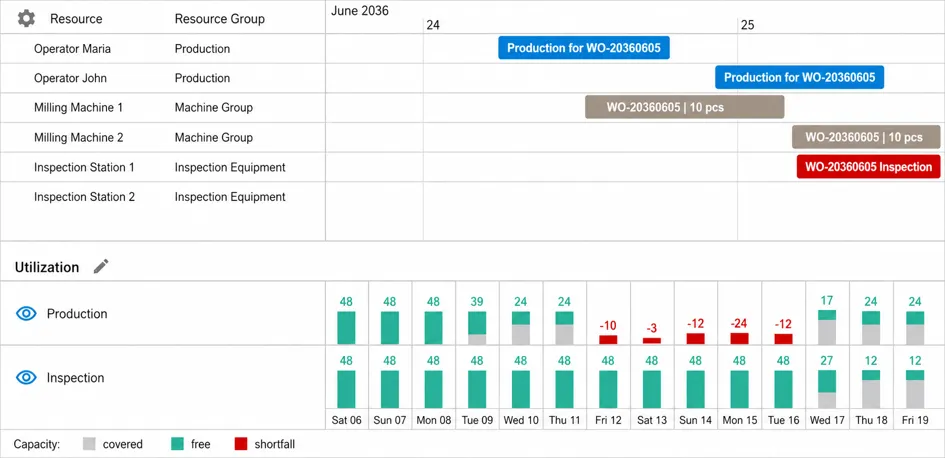
Utilization & Pool: Multiple Pools with Detailed Utilization Views
The pool utilization view has been redesigned. Now, up to 6 pools can now be displayed at the same time.
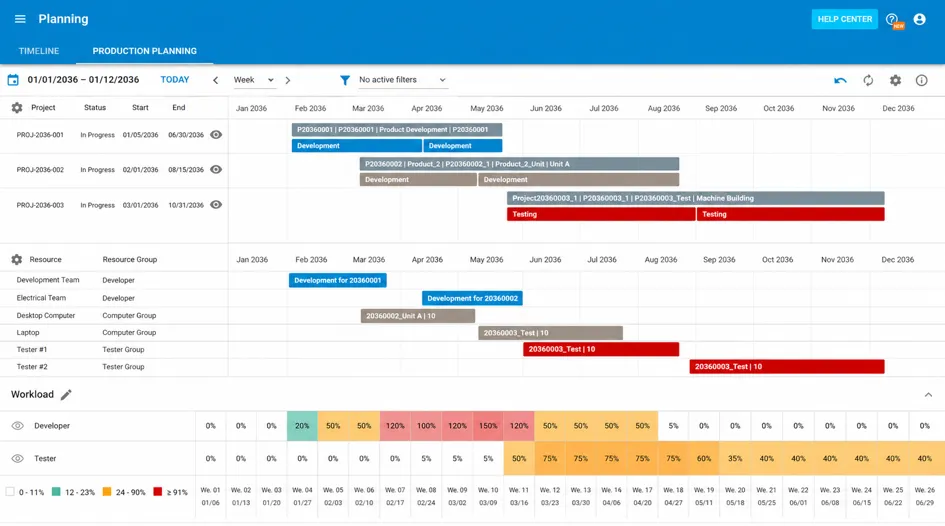
The detailed view for individual pools has also been redesigned. This makes it easier to compare pool utilization and understand available capacity.
Auto Import: Extended Configuration
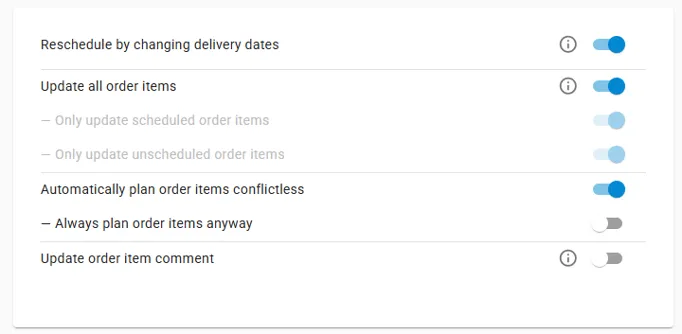
The configuration for updating and scheduling Order Items during import can now be managed directly in the frontend. You can find it in Administration → Settings → Import/APIs
New License Page
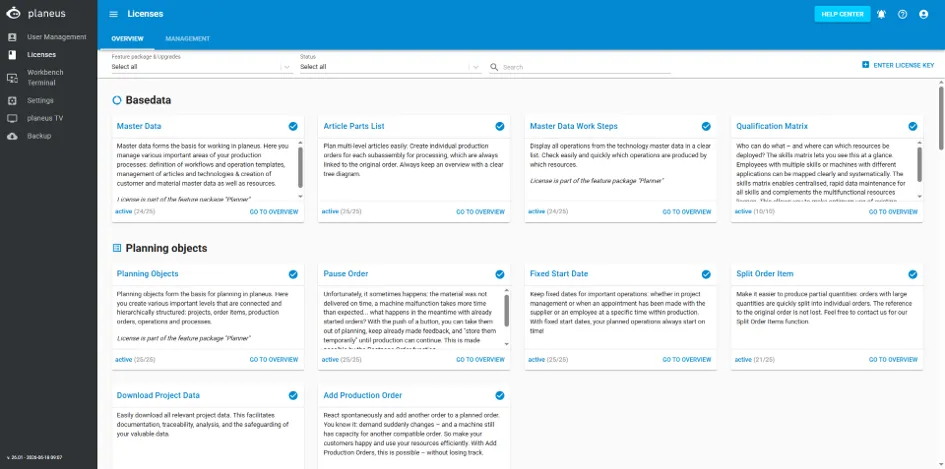
A new License page is now available.
It lists all modules and functional building blocks available in planeus.
The page shows:
- which functions are included in your current license
- which functions are available as optional extension This gives users a clearer overview of available and expandable functionality.
Additional improvements
- Improved planning algorithm and performance
- Accompanying work steps can now be deleted in the Gantt chart
- Filter settings of report plugins can be saved.
- Date and time formats can be configured per language.
- Optional: barcodes can be printed with an Enter character and in Code 128.
- New languages are now available: German, English, French, Italian, Portuguese, Spanish, Hungarian, Czech, Slovak, and Slovenian.
Roadmap / Preview of the next release
The following roadmap shows the most important functions planned for the next release.
Please note: all roadmap information is non-binding. Individual features may be changed, postponed, or removed.
MCP Interface for AI integration
With the new MCP interface — Model Context Protocol — planeus can be connected to AI assistants such as Claude.
AI systems (e.g., LLM) can use this interface to access planning data directly, including: Work Steps, Order Items & Resource Conflicts
This allows planners to receive support with generated analysis, reporting, and automated conflict resolution while always remains in control of the planning decisions.
Planning Priorities and Factored Scheduling
When multiple Order Items are scheduled at the same time, the following criteria could be considered:
- Customer priority
- Order Item priority
- Delivery dates
Planners will be able to define how strongly each criterion should influence the scheduling result.
This makes priority-based planning more flexible and transparent.
Extended Pool for Improved Workforce Planning
The Pools function would be extended to support multiple assignments in the technology area.
In addition, the scheduling algorithm would check pool availability in the future.
This will support more accurate workforce and resource planning.
Conflict Radar Redesign
The Conflict Radar will be redesigned to make the different conflict types easier to identify.
The following Conflict types will be shown more clearly:
- Overdue Delivery Dates
- Overloaded Resources
This will help planners recognize critical issues faster.
“My planeus” Page Redesign
My planeus page will be redesigned.
The goal is to make user-specific settings and information directly available in one place.
This may include:
- Video tutorials
- Help Center links
- User-Specific settings